
A Beginner's Guide to Facebook Ads
A new article on Search Engine Journal asks if Facebook Ads really work - and concludes that, yes, they do. This piece has everything you need to know about them and how to set up your first campaign.
Facebook ads may be struggling with Apple's App Tracking Transparency and lawsuits - but they actually work really well for advertisers. However, the author says that, depending on your industry, you need to consider if Facebook aligns with your business model. Facebook ads are not always the answer for more traffic, clients, or sales. If you're a business with a low cost of entry like an ecommerce pushing products or a SaaS that's driving sign-ups, it can be difficult to find success.
Originally, when Facebook launched its ad algorithm, it was based on an auction. It gave priority to the highest bid. Then, back in 2018, Mark Zuckerberg announced that Facebook would be shifting to prioritize "meaningful interactions."
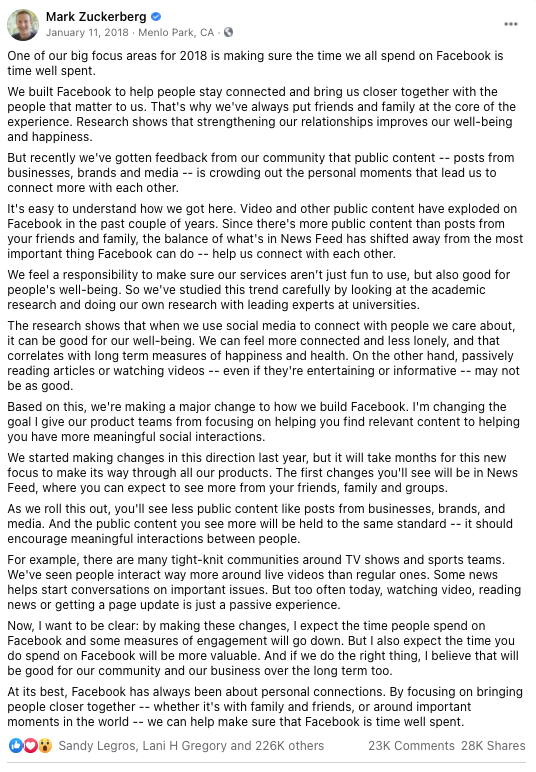
Facebook shifted more toward the user experience model while integrating the auction. The auction is based on:
Yet we still don't know precisely how Facebook's ad algorithm works. Eric Sodomka, a research scientist at Facebook that focuses on auctions, shared his first-party insights on how Facebook's ad algorithm works:
Eric revealed a little about how Facebook evaluates content:
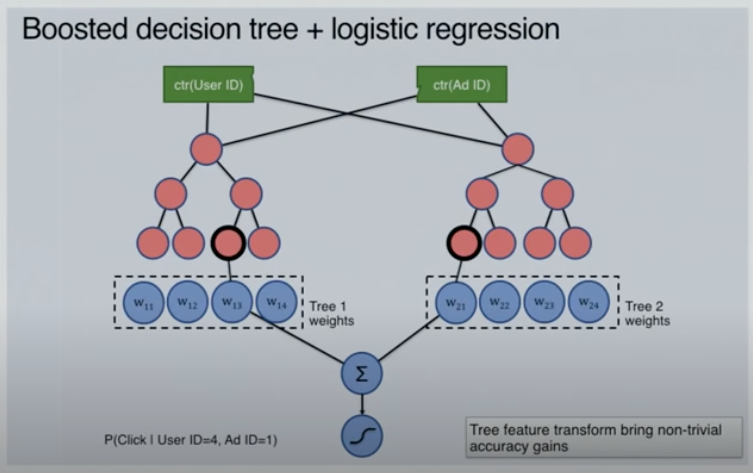
On the left, you'll see the probability that this specific user will click any ad. While, on the right side, you'll see the probability that a specific user will click this ad. Facebook uses this predictive data to decide the likelihood that someone will take an action. With Facebook's flexible analytics architecture, they do test various models outside of this.
How to Create Facebook Ads
Here's the author's guide to creating Facebook Ads.
First things first, before you can create an ad on Facebook, you'll want to create a Facebook Ads Manager account (if you have a business page). If you're not sure if you have an account, try to log into Facebook Ads Manager.
Step 1: Choose a Campaign Objective
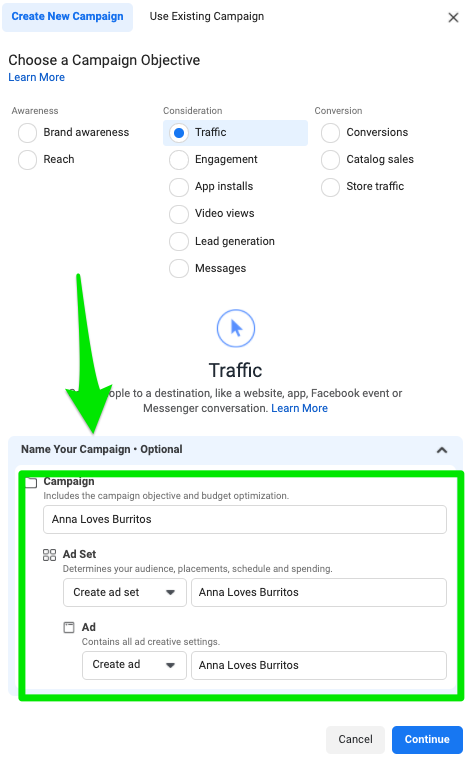
Facebook gives you options to select from the following goals
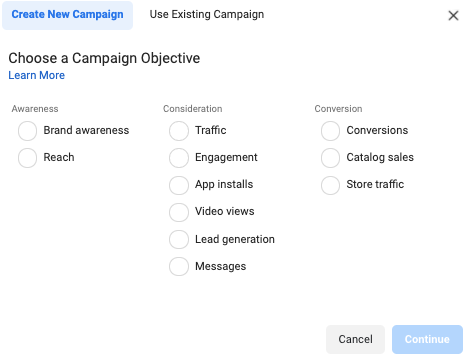
For the purposes of this article, I selected traffic as my goal.
Step 2: Name Your Campaign
After you select your campaign objective, you want to name your campaign along with the ad set and ad.
Step 3: Complete Campaign Details
After you name your campaign, Facebook will give you more campaign details to complete.
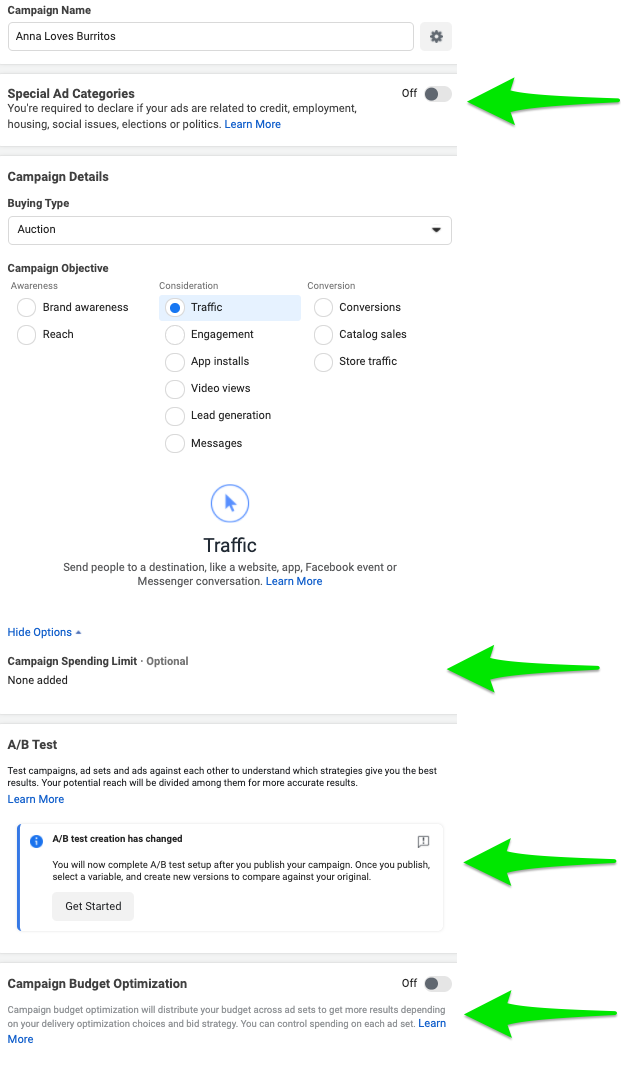
Here's a quick breakdown of each:
Step 4: Choose Budget, Schedule, Audience, and Delivery
This is my favorite step in creating Facebook ads. It's where the research and the data begin to come together. First, you can choose where you want to drive traffic.

Then, you can toggle dynamic creative on if you want Facebook to automatically generate variations depending on the audience most likely to engage. You'll want to pair this with automatic placements that I'll cover below. These are my new favorite ad sets from Facebook. Wordstream saw 60% more conversions after using dynamic creative ads in just 30 days.
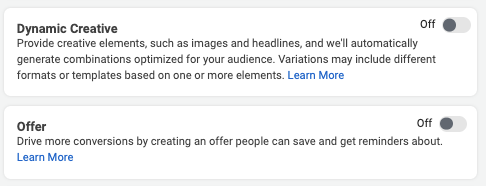
You can also use this to rotate in an offer style ad feature. This allows you to send automatic reminders, discount codes, and more. Swish used this to promote a 50% off discount at 7-Eleven stores and saw an increase of 66% of offline sales. Next, you can choose your budget and schedule.
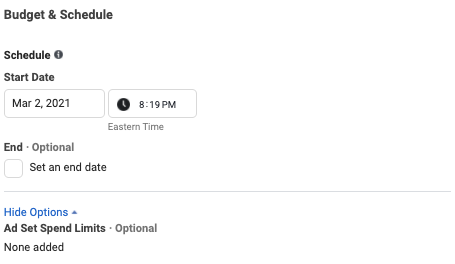
Followed by audience creation.
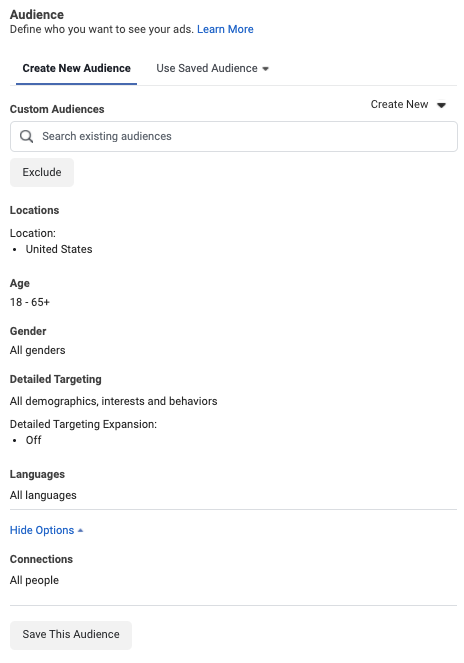
Until you get down to the placements, optimization, and delivery at the bottom.
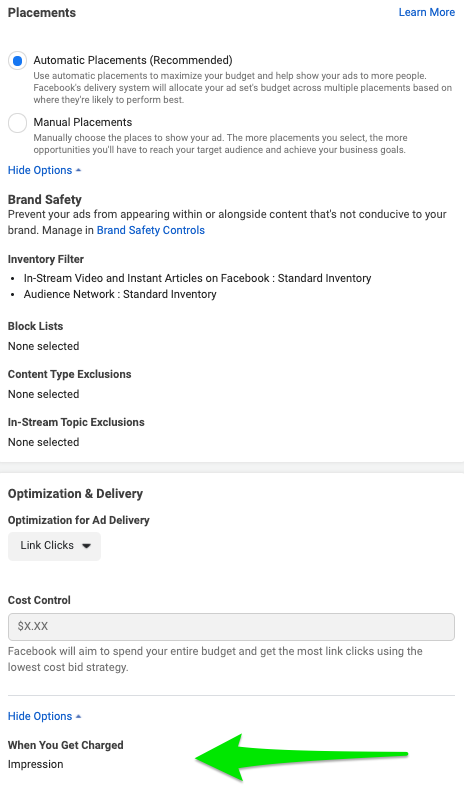
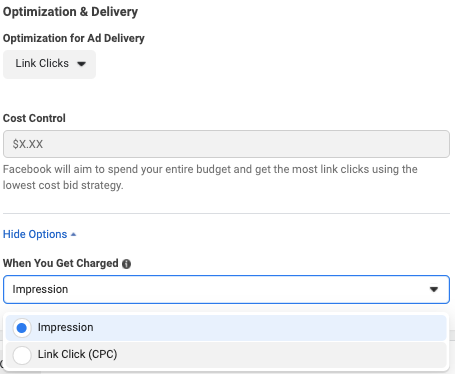
One element you'll want to remember to check is how you get charged for these Facebook ads. Facebook is tricky and hides this all the way at the bottom.
Step 5: Choose Ad Format
You're on the final stretch! On the last page of the Facebook ad set-up, you have the option to select the format you'd like to structure your ad for users. This is where your ad type knowledge from above comes in handy.

Step 6: Upload Creatives
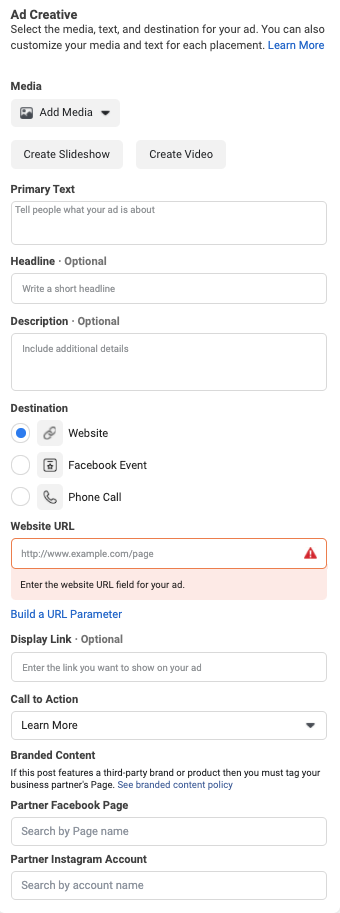
Now, you can upload your media and add ad copy and a landing page URL.
Step 7: Select Languages
If you're a global company or a local company targeting other dialects, you will want to add your own transcripts to your ads.
https://cdn.searchenginejournal.com/wp-content/uploads/2021/04/languages-607980b16ab2c.png
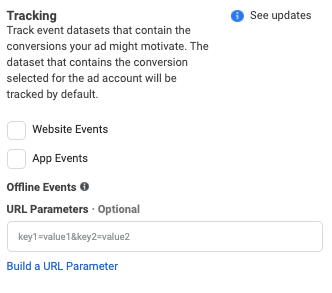
Step 8: Set Up Tracking and URL Parameters
This last step is the most important step. You want to always track your data and select a URL parameter to understand how your ads are converting and what's motivating users to click.
Facebook ads may be struggling with Apple's App Tracking Transparency and lawsuits - but they actually work really well for advertisers. However, the author says that, depending on your industry, you need to consider if Facebook aligns with your business model. Facebook ads are not always the answer for more traffic, clients, or sales. If you're a business with a low cost of entry like an ecommerce pushing products or a SaaS that's driving sign-ups, it can be difficult to find success.
Originally, when Facebook launched its ad algorithm, it was based on an auction. It gave priority to the highest bid. Then, back in 2018, Mark Zuckerberg announced that Facebook would be shifting to prioritize "meaningful interactions."
Facebook shifted more toward the user experience model while integrating the auction. The auction is based on:
- Ad rank.
- Advertiser bid.
- Estimated action rates.
- Ad relevancy and quality.
Yet we still don't know precisely how Facebook's ad algorithm works. Eric Sodomka, a research scientist at Facebook that focuses on auctions, shared his first-party insights on how Facebook's ad algorithm works:
Eric revealed a little about how Facebook evaluates content:
On the left, you'll see the probability that this specific user will click any ad. While, on the right side, you'll see the probability that a specific user will click this ad. Facebook uses this predictive data to decide the likelihood that someone will take an action. With Facebook's flexible analytics architecture, they do test various models outside of this.
How to Create Facebook Ads
Here's the author's guide to creating Facebook Ads.
First things first, before you can create an ad on Facebook, you'll want to create a Facebook Ads Manager account (if you have a business page). If you're not sure if you have an account, try to log into Facebook Ads Manager.
Step 1: Choose a Campaign Objective
Facebook gives you options to select from the following goals
For the purposes of this article, I selected traffic as my goal.
Step 2: Name Your Campaign
After you select your campaign objective, you want to name your campaign along with the ad set and ad.
Step 3: Complete Campaign Details
After you name your campaign, Facebook will give you more campaign details to complete.
Here's a quick breakdown of each:
- Special Ad Categories: If your ad relates to credit, employment, house, social issues, elections, or politics, you must select this option. Due to the restraints of certain countries, there are different steps Facebook must follow to be legally compliant.
- Campaign Spending Limit: Similar to budget optimization, the campaign spending limit stops delivering your ad once that limit is reached. Facebook will send you a notification to let you know the limit has been reached so you'll have the option to keep it running if you'd like.
- A/B Tests: Facebook allows ad managers to test creatives, audience, and placement to uncover the best-performing campaign. If you select this option, Facebook will automatically make this the A of the A/B test.
- Campaign Budget Optimization: This allows you to set a budget at a campaign level. In the past, Facebook only allowed users to set this at an ad set level so it caused a lot of complications when allocating budgets to different audiences.
Step 4: Choose Budget, Schedule, Audience, and Delivery
This is my favorite step in creating Facebook ads. It's where the research and the data begin to come together. First, you can choose where you want to drive traffic.
Then, you can toggle dynamic creative on if you want Facebook to automatically generate variations depending on the audience most likely to engage. You'll want to pair this with automatic placements that I'll cover below. These are my new favorite ad sets from Facebook. Wordstream saw 60% more conversions after using dynamic creative ads in just 30 days.
You can also use this to rotate in an offer style ad feature. This allows you to send automatic reminders, discount codes, and more. Swish used this to promote a 50% off discount at 7-Eleven stores and saw an increase of 66% of offline sales. Next, you can choose your budget and schedule.
Followed by audience creation.
Until you get down to the placements, optimization, and delivery at the bottom.
One element you'll want to remember to check is how you get charged for these Facebook ads. Facebook is tricky and hides this all the way at the bottom.
Step 5: Choose Ad Format
You're on the final stretch! On the last page of the Facebook ad set-up, you have the option to select the format you'd like to structure your ad for users. This is where your ad type knowledge from above comes in handy.
Step 6: Upload Creatives
Now, you can upload your media and add ad copy and a landing page URL.
Step 7: Select Languages
If you're a global company or a local company targeting other dialects, you will want to add your own transcripts to your ads.
https://cdn.searchenginejournal.com/wp-content/uploads/2021/04/languages-607980b16ab2c.png
Step 8: Set Up Tracking and URL Parameters
This last step is the most important step. You want to always track your data and select a URL parameter to understand how your ads are converting and what's motivating users to click.
Michael Harrington
Click Here For Our Anti-Aging STEM CELL Activation Patches